


The demo took about ninety seconds. I watched an AI agent book a meeting, draft the follow-up, and update the CRM while the sales team it had been built for looked on, and by the end everyone in the room was sold. Six weeks later the same agent was quietly booking meetings into the wrong time zone and quoting a discount that no longer existed. Nothing had changed about the model. What changed was the context it was working in.
That sounds like a story about a flaky model. It isn’t. It’s a story about engineering: the unglamorous craft that decides whether an agent still works in week six.
Most agents plateau at the demo because the demo is the easy case. The teams that get past it are not using a secret model. They are disciplined about three things: what the agent sees (context engineering), what it remembers (memory), and how its abilities are put together (skills).
This piece walks all three at the altitude a leader actually needs, and ends with the questions you can ask to tell mastery from theatre. If you want the parts list first (what an agent harness is actually made of), that is a separate piece coming to this journal; this one is about running those parts well. It takes one thing for granted: that a person stays in the verification loop. Context, memory, and skills are what make that loop worth running.
Start with why the demo lies
A demo lives in a short, clean, single-shot conversation. A production agent accumulates history, tools, and retrieved documents until its working context is long and messy. The intuitive fix is a bigger context window. The counter-intuitive, well-evidenced finding is that a bigger window does not produce a better agent, and often produces a worse one.
Anthropic’s engineering team frames the reason as an “attention budget”. A model has a finite capacity to attend across the tokens it is given, and every extra token spends some of that budget. Context is a budget, not a bucket. You do not win by filling it.
The evidence for the budget view is not a vendor’s word. Chroma tested 18 models (GPT-4.1, Claude 4, and Gemini 2.5 among them) and found performance degrades as input grows, even on simple tasks: an empirical result across a spread of models, not a marketing claim. Longer context also opens specific, named failure modes that a short demo never triggers:
- Poisoning. A hallucination slips into the context and then gets cited again and again, so a wrong fact hardens into a premise.
- Distraction. Accumulated history pulls the model toward repeating past actions instead of forming a new plan.
- Too many tools crowd the decision. On the GeoEngine benchmark, a quantised (compressed) Llama 3.1 8B failed a query with all 46 tools loaded and succeeded when the set was cut to 19, with the whole thing comfortably inside the context window. Same model, same window, fewer choices.
- Contradiction. Parts of a long context conflict. LLMs Get Lost in Multi-Turn Conversation, from Microsoft and Salesforce, split single prompts across several turns and measured an average 39% drop across six generation tasks, with OpenAI’s o3 falling from 98.1 to 64.1 (read that as a controlled test of one failure shape, not a universal number).
None of this is exotic. A Databricks study put the onset of decay around 32,000 tokens for Llama 3.1 405B, well short of its advertised window: one benchmark on one model, but a useful order of magnitude. The gap between demo and production is not model choice. It is that nobody engineered the context, and the context is where agents actually fail.
What you put in front of the model, and what you keep out
Context engineering is the technique that does the most work, because it is the one you control most directly. The goal is the smallest set of high-signal tokens that still fully specifies the behaviour you want. Minimal does not mean short: it means nothing in the window is dead weight.
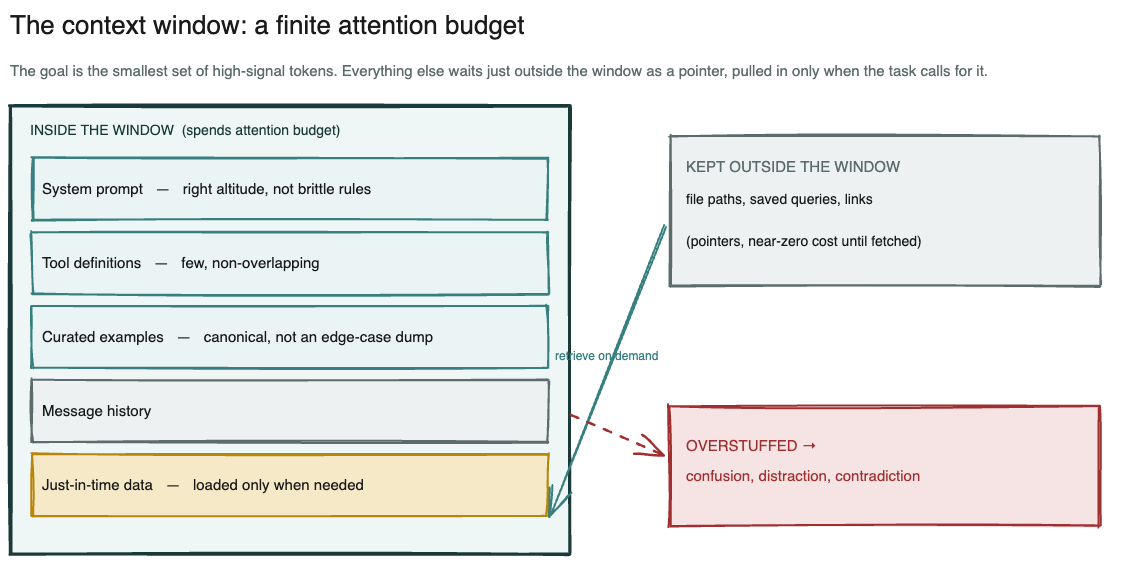
A well-engineered context: a lean set of high-signal material inside the window, and pointers to everything else held outside it, fetched when the task calls for them.
Three things belong inside. A system prompt at the right altitude, sitting between brittle hardcoded rules (too fragile) and vague hand-waving (too loose). A tool set that is small and non-overlapping, because the most common production failure Anthropic reports is a bloated tool set with ambiguous decision points: if a human engineer cannot say which tool to use, the agent cannot either. And a few canonical examples rather than a long list of edge cases.
The harder discipline is what you keep out. The field is shifting away from stuffing everything in ahead of time and toward “just-in-time” retrieval: the agent holds lightweight pointers (a file path, a saved query, a link) and pulls the full content only when it needs it, the way you work from an inbox instead of memorising every email. The pointer itself carries signal. A file living at tests/test_utils.py tells the agent something different from one at src/core_logic, before a single line is read.
Mind your context, a quick checklist.
- In: a system prompt at the right altitude, a few non-overlapping tools, a handful of canonical examples.
- Out: everything else, held as a pointer and fetched only when the task calls for it.
- The test, for anything you are unsure about: name the decision this token helps the agent make. If you cannot name one, it is spending attention budget you will want back later.
Curation buys more than tokens. It buys reliability. In Making Failure Safe, published in June 2026, a team swapped an open-ended AI web-scraper for typed, verifiable configuration files; on the 80 of its 138 benchmark tasks whose sources were independently verified, the system ran with zero execution-stage model tokens. Read that as one clean data point rather than a law: a narrow, checkable contract beats free-form generation.
Reliability comes from the scaffolding around the model, not from a bigger model. The first thing to scaffold after context is memory.
What the agent remembers, and when remembering hurts
Memory is where teams most often over-reach, because “make it remember everything” sounds like progress. Memory is tiered, and the useful question is narrower than “can it remember”: what should persist, and when should it come back?
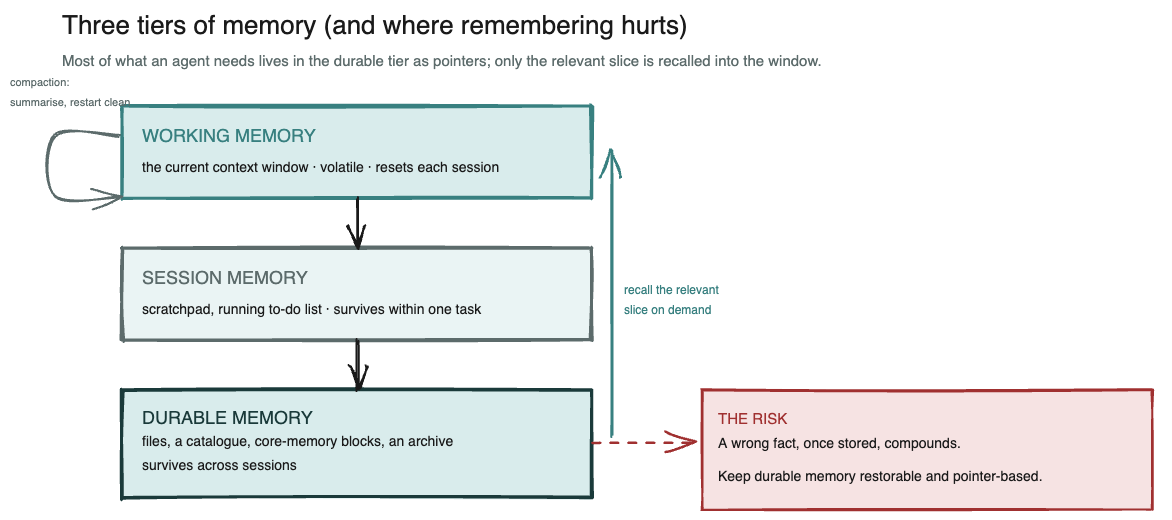
Three tiers of memory. Most of what an agent needs should live in the durable tier as pointers to ground truth, with only the relevant slice recalled into the working window.
Working memory is the current context window: volatile, and gone when the session resets. Session memory is a scratchpad the agent keeps within a task, such as a running to-do list it rewrites so the goal stays in recent view over a long job. Durable memory persists across sessions, and it usually takes one of two shapes.
In the first, the agent writes notes to a file it can re-read later. Anthropic’s own context-engineering write-up points at Claude Plays Pokémon, an agent that keeps precise tallies across thousands of game steps and draws maps of the regions it has explored, with no prompting at all about how to structure memory (a vendor illustrating its own system, but a legible illustration). In the second, the system pages information in and out of the window on demand, the way an operating system moves data between memory and disk. When the window fills, compaction summarises it and starts a fresh window from the summary.
Vendors skip the other half. Remembering has a cost, and durable memory re-imports every failure mode from the section above. A wrong fact that reaches durable memory does not wash out on the next reset; it gets recalled and cited again, so memory amplifies the error instead of forgetting it. More remembered history means more pull toward repeating what the agent already did. Compaction is lossy by design: aggressive summarising can drop a subtle detail whose importance only shows up later.
The rule that falls out: make memory a pointer to ground truth, not a lossy copy that quietly drifts. Store the link and re-fetch the page rather than storing a stale paraphrase of it.
None of this needs heavy infrastructure. Paul Iusztin’s open-source AI Research OS builds durable agent memory out of three plain layers: the raw source files, an index.yaml catalogue the agent reads first, and a wiki it keeps extending as new questions arrive. No vector database, no platform: files and discipline, which is the register a mid-sized team can actually run. That leaves the last technique, the one that decides which abilities get to read all this memory in the first place.
One clean skill beats one giant prompt
The instinct, once an agent works, is to keep adding to its instructions until the prompt is a wall of text covering every case. This is the mega-prompt, and it fails for the reason already met above: every instruction and every tool sits in the window at once. The budget goes on overhead. The alternative is to treat abilities as composable skills with clean boundaries.
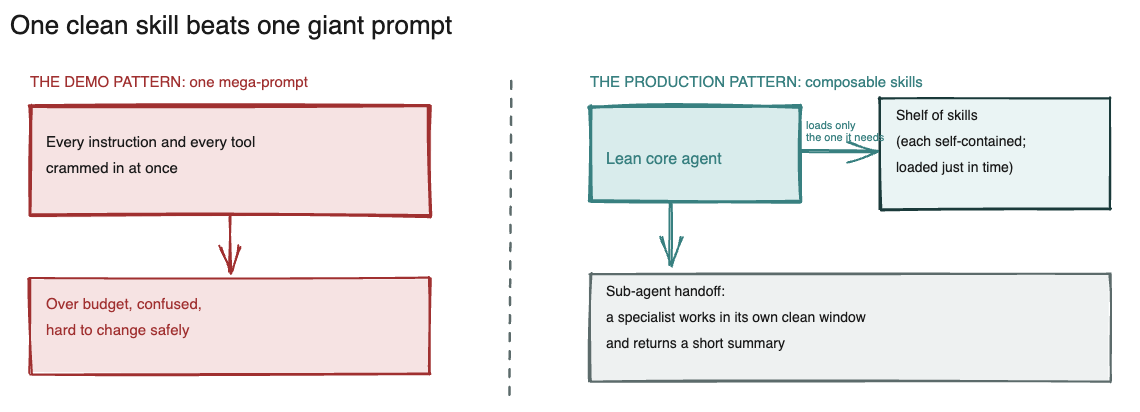
Left, the demo pattern that does not scale: one prompt holding everything. Right, the production pattern: a small core that loads the right ability only when it is needed, and hands specialist work to a sub-agent with its own clean context.
Anthropic’s Agent Skills are the reference model, and the mechanism is the same discipline as context engineering. A skill is a folder with instructions and, optionally, runnable code; Anthropic’s own metaphor for it is the onboarding guide you would write for a new hire. It loads in three stages:
- At startup, the agent sees only each skill’s name and one-line description, which is cheap enough to hold dozens of them.
- When a skill looks relevant, it reads the full instructions.
- Only when the work needs it, it opens the bundled detail: the scripts, the reference files, the worked examples.
Because almost nothing sits in the window until it is required, a skill can carry a great deal of material at very little standing cost.
Two properties make this more than tidy filing. A skill can hold deterministic code, so work that should be exact (sorting a list, pulling fields from a form) runs as code rather than as generated text, which makes it consistent and repeatable. And when a job spans several specialities, a sub-agent can take one part in its own clean window and return a short summary, so the lead agent keeps a high-level plan instead of drowning in detail.
Anthropic’s multi-agent research system reports a 90.2% improvement over a single agent on its internal research eval (the vendor’s benchmark on the vendor’s own system: read it as a direction, not a score), and in the same write-up puts the token cost at roughly fifteen times that of a chat. The gain is real. It is not free.
One rule of thumb from practice does most of the work here: any behaviour you have to remind an agent of more than twice belongs in a reusable skill. That is the boundary test. If your team cannot point to where a given behaviour lives, it lives everywhere, which means it lives in the mega-prompt. You can check that without reading a line of code.
The questions to ask before you believe the demo
You do not need to write code to judge whether a vendor or an internal team has mastered this. Ask about the three techniques and listen to the shape of the answer. Good answers describe choices someone actually made; theatre describes ambition.
- On context: “What do you deliberately keep out of the model’s context, and how do you decide?” A curation story is mastery. “We use a one-million-token window and put everything in” is the opposite.
- On tools: “What have you taken out of the tool set, and why?” Mastery names the too-many-tools failure and can point at something it removed; theatre only ever adds.
- On memory: “What does the agent keep across sessions, where does it live, and how do you stop a wrong fact from poisoning later runs?” Mastery describes restorable, pointer-based memory and a correction path; theatre says “it just remembers everything”.
- On forgetting: “When does the agent forget on purpose?” A team that has never designed forgetting has not yet hit the failure modes in production.
- On composition: “Is this one big prompt, or composable skills with clean boundaries, and where does deterministic work run as code?”
Then one cross-cutting question that outranks the rest: “show me where it fails, and how it recovers.” Recovery is the part a demo cannot rehearse. A team that can only show you the happy path has a demo, not a production system. Ask to see the recovery, and watch whether they reach for a designed answer or an apology.
If you take one thing from this into your next vendor call, take that question.
Better still, run the test on an agent you already have. Pick one that has been in service for a month, look at what it actually sees this morning, and find the tokens nobody decided to put there. Then take them out. That afternoon will teach you more about context, memory, and skills than any demo will, and it is roughly the work I do with clients when an agent stops behaving the way it did in week one.